12 AI Video Prompts You Can Copy, Paste, and Generate in 2026
Stop staring at a blank prompt box. Twelve AI video prompts with scene-level camera, light, and audio direction — open any one in the editor and ship it tonight.
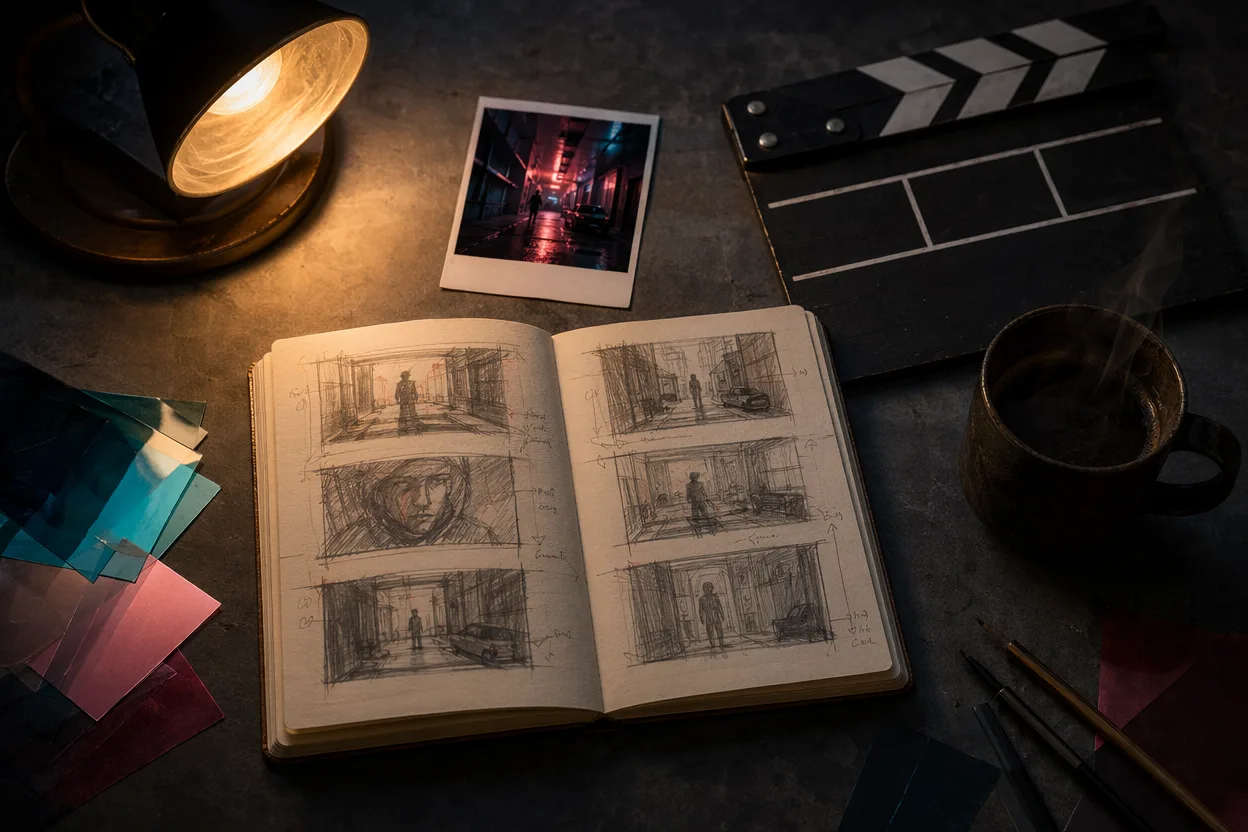
Most AI video prompts you find online read like a thesaurus dump — "cinematic, epic, hyperreal, 8K, masterpiece" — and they render into the same plastic-skinned hallway your last seventeen tries did. The problem isn't your generator. The problem is that a prompt that lists adjectives instead of decisions gives the model nothing to commit to.
This post does the opposite. Twelve scene-named recipes, each one written as a single paragraph a camera operator, a gaffer and a sound designer could actually shoot. Every recipe is broken down across the same five dimensions — camera move, lighting, lens, sound design, subject staging — so once you've seen the framework, you can swap subjects and keep the structure. Paste any of them into the editor and you'll see a watchable cut on the first generate, not the fifth.
The twelve scenes cluster into three families. Cinematic and story-driven recipes — the one-shot dolly, the noir kitchen mashup, the hyperreal close-up, the transformation morph — exist to stress-test coherence, lip-sync and lighting on whatever model you point them at. POV and documentary-style recipes — first-person character vlogs, fake bodycam footage, talking-animal vox pops, planetary-cameo gags — are the highest-multiplier formats on TikTok and Shorts right now, and they reward structural framing over visual flourish. The iconic-IP and format-hijack recipes close out the set, teaching you that the comedy lives in the friction between an instantly recognisable register and a mundane subject.
Each entry ships with a copy-paste prompt block, a "why this works" breakdown, and a one-click button that loads the same recipe into the editor for you. No model names, no paywall, no setup.
The 5-dimension prompt recipe
Every entry below is written against the same five-dimension recipe — camera move, lighting, lens, sound design, subject staging — and the reason is simple. When you give a generator only adjectives ("cinematic," "moody," "stunning"), it averages across millions of training frames and hands you the mean. When you give it five specific decisions, the model has something to lock onto, and the output stops being generic. Read the dimensions once here; you'll see them recur in every recipe.
Camera move is the first decision because it sets the grammar of the shot. A dolly-in tells the model the world is being entered; a drone reveal tells it the world is being surveyed; a locked-off static shot tells it the world is being observed; a handheld tells it the world is being chased. Mixing two of these in one prompt — "panning while zooming" — almost always confuses the renderer into a wobble. Pick one motion and commit to its arc length.
Lighting is where most prompts collapse, because writers reach for mood words instead of physics. Specify a direction (key from camera-left, rim from behind), a colour temperature (3200K tungsten, 5600K daylight, mixed sodium-and-neon), and a quality (hard noon sun versus soft overcast bounce). "Moody lighting" gives the model nothing; "low-angle key, warm tungsten, hard shadows on the back wall" gives it three constraints it can actually render.
Lens controls how much of the world fits in the frame and how distorted it looks. A wide 24mm puts the viewer inside the room and exaggerates motion toward the camera; a 50mm sees the way the eye sees and disappears; a 100mm macro flattens space and isolates texture; an anamorphic gives you the horizontal flares that read instantly as cinema. Name the focal length and the model stops guessing.
Sound design is the dimension that separates a screenshot from a video. Every recipe in this post names what the viewer hears — dialogue with a register ("whispered, half-laughing"), ambient texture ("rain on a metal awning, distant siren"), the choice of silence over score, or a single musical cue. Without an audio decision, the renderer will either insert generic stock or — worse — leave the cut feeling like a muted GIF.
Subject staging ties the other four together: who is in the frame, where they're blocked, and what they're doing with their hands and eyes. "A person walking" is a non-decision. "A courier on a moped passes camera-left to camera-right at one-and-a-quarter walking pace, helmet visor cracked open" is a shot.
Memorise the order — camera, light, lens, sound, staging — and you can write a prompt without looking at a template. Or open the editor with the recipe pre-loaded and rewrite one of ours into your own subject.
Cinematic and story-driven prompts
The first four AI video prompts in this gallery share one ambition: they want to look like something you would let run on a forty-inch screen instead of swiping past on a feed. Each one leans on a single piece of grown-up film grammar — a long unbroken camera move, a chiaroscuro interrogation light, a quiet dialogue close-up, a one-take morph — and treats that grammar as the load-bearing wall the whole prompt hangs from. There are no jump cuts, no compilation montages, no on-screen captions doing the emotional work. The picture has to carry it.
Across the four, the DNA is the same. Visually, every entry locks one camera language and holds it: dolly, blinds, 50mm portrait, or locked-off wide. Sonically, none of them lean on a music bed; ambient room tone, rain, ticks, and breath do the heavy lifting so the model is forced to render diegetic audio rather than hide behind a track. Structurally, each prompt names a subject, an action, a lens, a light, a sound, and an ending in roughly that order — the five-dimension recipe we unpack later. That's what stops a "cinematic" prompt from collapsing into mood-word soup.
1 — Neon-soaked dolly through a rain-slick alley
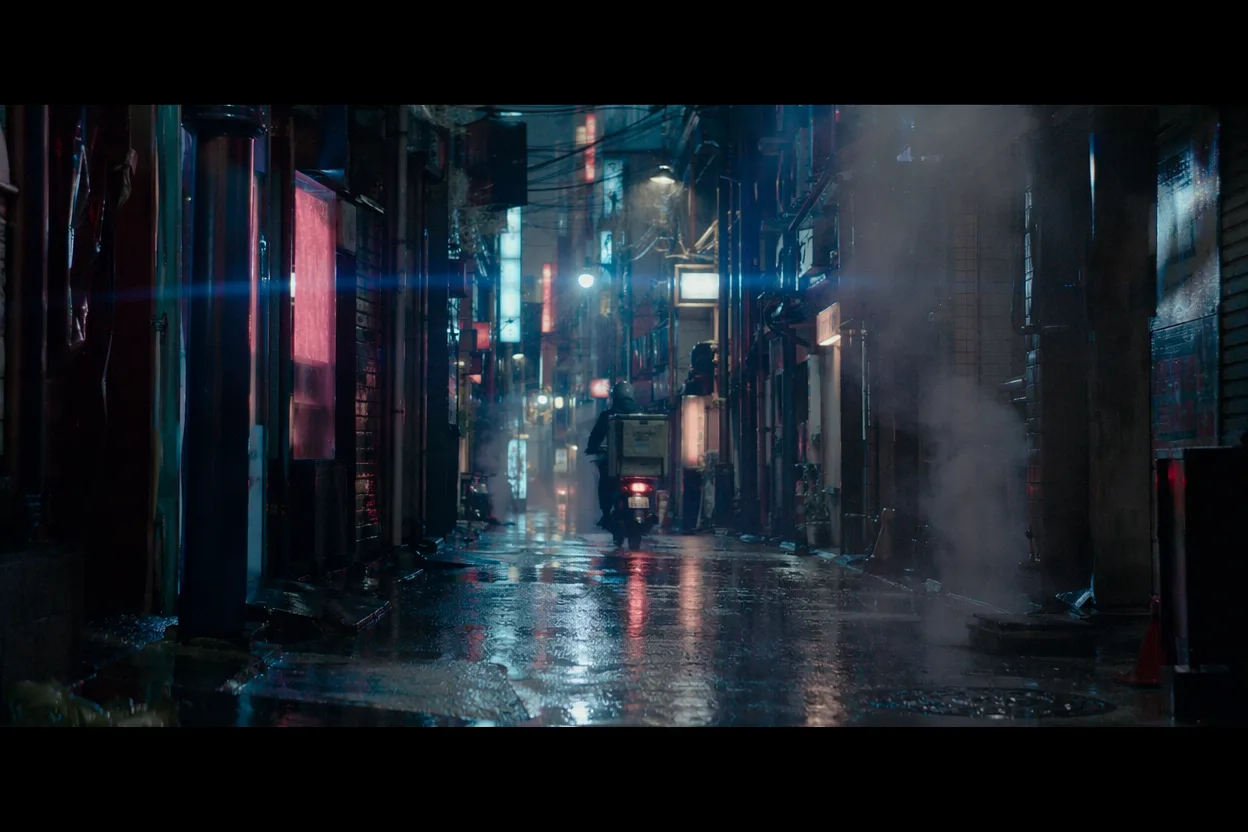
This is the one-shot flex — the prompt you run when you want to know whether your default model can hold a frame together for more than three seconds. The camera is doing one thing: gliding forward, slowly, through a Tokyo back alley at 2 a.m. while the city does its own thing around it. A noodle stall venting steam on the left. A courier on a moped easing past on the right. Puddles holding pink-and-cyan reflections of kanji signage overhead. Nothing edits, nothing cuts, nothing zooms — the entire shot is one quiet two-hundred-foot push, and the test is whether the parallax, the reflections, and the haze stay coherent the whole way down. If you want the same engine to handle structured beats for a full book trailer later, this is the dry run.
A continuous unbroken dolly shot moving forward at 1.2x walking pace down a narrow Tokyo back alley at 2 a.m., shot anamorphic 2.39:1 on a wide cinema lens, slight ground-level perspective. The alley is wet from recent rain, puddles holding pink and cyan reflections of overhead neon kanji signage, atmospheric haze in the deep background, steam rising from a noodle stall vent on the left, a lone courier on a moped easing past on the right, no other foot traffic. Horizontal anamorphic lens flares streak off the neon signs as the camera passes. Lighting is mixed neon practicals only, no key light, deep shadows in doorways. Sound: constant rain hiss on pavement, distant traffic rumble, a faint Japanese AM radio bleeding from the noodle stall, no music. The shot ends with the camera still moving forward as the alley curves out of frame.
What makes this prompt earn its run time is that every dimension is doing one job and only one job. The camera is committed to a single continuous dolly, so the model can't fall back on cut-aways to mask coherence drift. The lens choice — anamorphic 2.39:1 — locks the aspect ratio and gives the engine permission to render the horizontal flare streaks that sell "this is a movie" before any subject appears. Lighting is named as practicals only, which forces the neon signs to behave as real light sources rather than decorative texture. The diegetic sound bed is the quiet flex: no score means the rain and the radio have to render cleanly. And the subject staging is almost subtractive — one moped, one stall, nobody else — so the alley itself becomes the protagonist.
Key visual: a 1.2x-walking-pace dolly down anamorphic 2.39:1 wet pavement, neon flares streaking horizontal. Key sound: rain hiss, distant traffic rumble, faint Japanese radio from the noodle stall, no score.
2 — Black-and-white toaster detective interrogates a sandwich
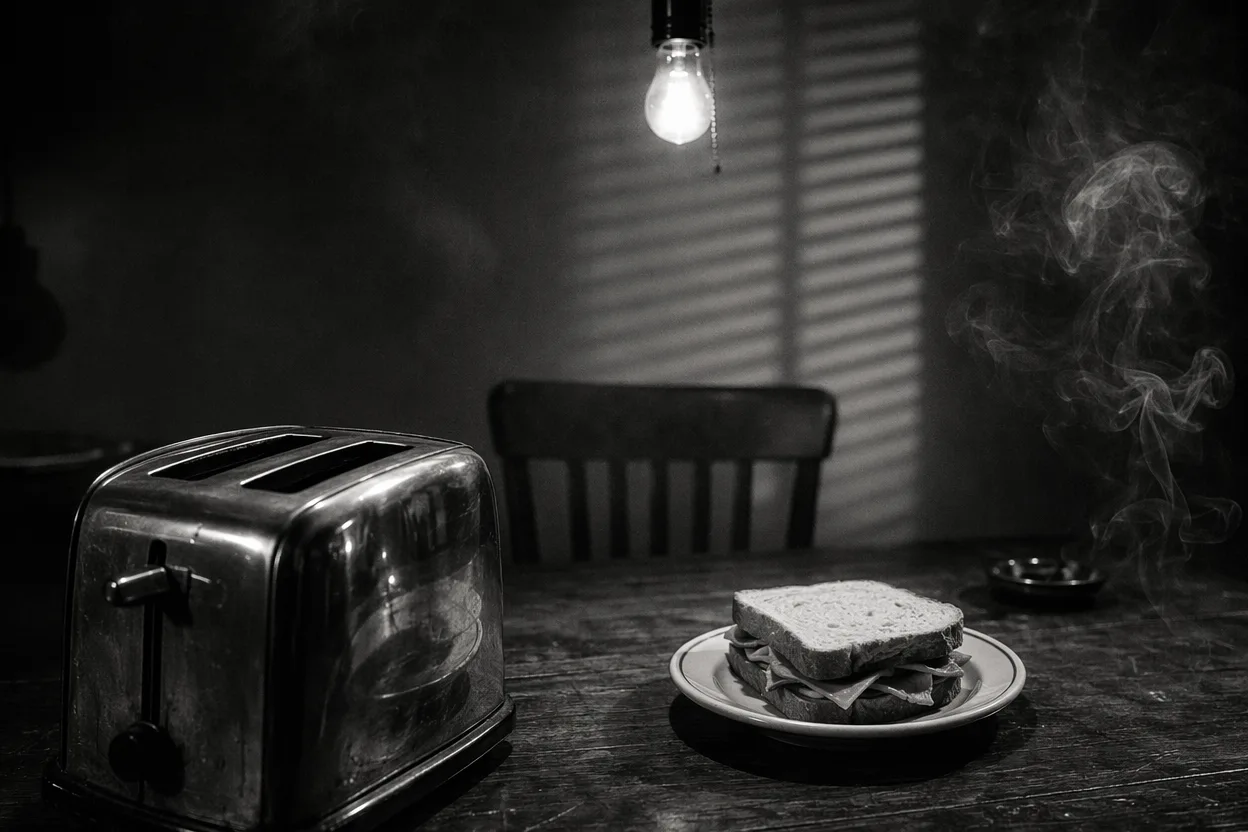
Drop a 1940s interrogation room into a generator and you get something pretty. Drop a 1940s interrogation room with a chrome two-slice toaster as the detective and a ham sandwich as the suspect, and the joke only lands if every other dimension stays straight-faced. The bulb swings. The venetian blinds throw moving shadow bars across both "faces." Smoke curls past the sandwich's lettuce. The toaster levers click softly like it's breathing. Nobody in the scene — narration, sound design, lens choice, lighting — admits that one party is a kitchen appliance, and that's exactly why it works. Some of the same five-dimension scaffolding shows up in our horror-story prompt recipes built on the same five dimensions, if you want to see the trick run with menace instead of comedy.
A 1940s film noir interrogation room, shot in black and white on 35mm with visible grain, single bare bulb swinging slowly overhead. Hard chiaroscuro lighting, venetian blinds on the unseen window throwing moving horizontal shadow bars across both faces in the frame. On one side of a battered wooden table sits a chrome two-slice toaster, lever up. Opposite it, on a small enamel plate, sits a single ham sandwich. Camera holds a medium two-shot then slowly pushes in, shallow depth of field, focus pulling between the toaster slot and the sandwich crust. Cigarette smoke curls up between them. Sound: a tinny voice-over monologue in a 1940s radio-announcer register delivering one straight noir interrogation line, distant saxophone, a ticking wall clock, the soft mechanical click of the toaster levers as breathing. No laugh track. The scene ends on the bulb still swinging.
The mechanism here is tonal commitment across all five dimensions. The camera is doing classical noir staging — medium two-shot pushing into a focus-pull — and refuses to wink at the absurdity. The lighting is named explicitly as hard chiaroscuro with moving blind shadows, which is what costs most cheap noir prompts the look. The 35mm grain plate gives the model a texture to lock to rather than producing a cleaned-up digital surface. Sound design carries the whole joke: a straight-delivered 1940s radio register, a saxophone, a wall clock, and the toaster levers reassigned as breath are doing the comedy work without anyone saying "funny." And the subject staging — two objects at a table — leaves no room for cut-aways the engine could hide behind.
Key visual: blinds slicing horizontal shadow bars across a chrome toaster and a ham sandwich under one swinging bulb. Key sound: tinny noir voice-over, a distant saxophone, the wall clock tick, and the toaster levers clicking as breath.
3 — Hyperreal close-up confession in a parked car
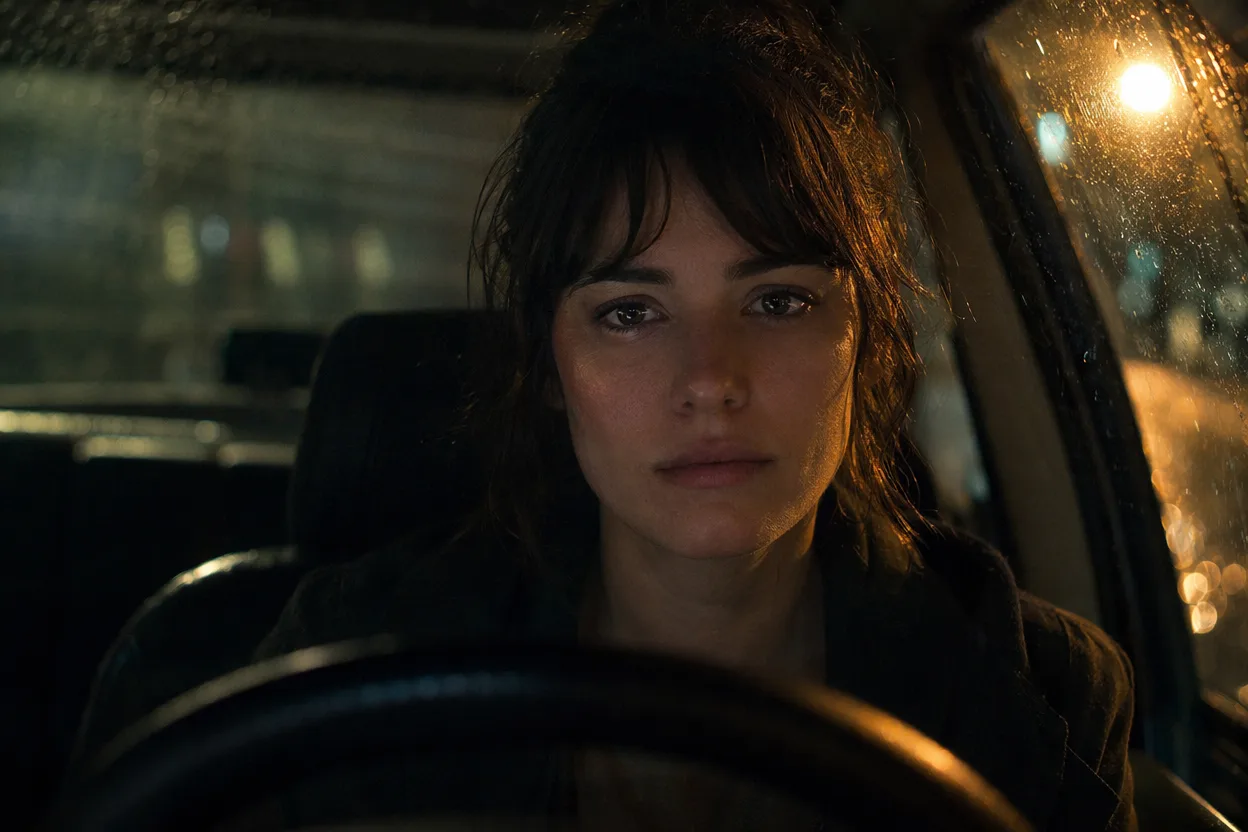
This is the lip-sync stress test. One person, behind the wheel of a parked car at night, says exactly one line to someone offscreen in the passenger seat: "I should have called you back." The car never moves. The wipers stay off. There is no other dialogue, no music, no second angle — just one tight 50mm portrait and one breath. What you're really evaluating is the gap between phoneme and frame: whether the mouth shapes, the eye micro-expressions, and the breath all live on the same head. The same emotional-restraint discipline shows up in our bedtime story video generator, which leans on the same "let the picture breathe" rule for a softer use case.
A tight 50mm portrait close-up of a single character sitting behind the wheel of a stationary car at night, parked on a quiet street. Camera is locked, framing eyes to chin, shallow depth of field with focus on the eyes. Lighting is dashboard amber backlight tracing the jawline plus one slow pass of a streetlight crossing the face from left to right, no key light. Rolling rain blur on the windshield behind. The character looks slightly off-camera toward an unseen passenger and delivers exactly one quiet line, just above a whisper, in native lip-sync audio: 'I should have called you back.' One visible breath after the line, then a small swallow, then stillness. Sound: dull patter of rain on the car roof, distant single car door slamming, ambient interior cabin tone, no music, wipers off. End on the held look.
The prompt earns its restraint by naming exactly what each dimension is not doing. The camera is locked — no handheld drift, no push-in, no rack — so the only motion in the frame is the face and the streetlight pass. The lens is given as 50mm portrait with focus on the eyes, which keeps the engine from defaulting to the wider, flatter "interview" look most generators reach for. Lighting is sourced entirely as practicals: dashboard amber plus a moving streetlight, no fill. The sound spec is almost subtractive — rain, a distant door, cabin tone — leaving the dialogue alone in the center of the mix so the lip-sync has nowhere to hide. And the subject is staged to deliver one line and then stop, which is the move most prompts forget.
Key visual: a locked 50mm close-up, focus on the eyes, dashboard amber tracing the jawline, one streetlight pass. Key sound: a near-whispered single line, rain on the roof, one distant car door, ambient cabin tone, no score.
4 — Garage glow-up morph in one ninety-second pass
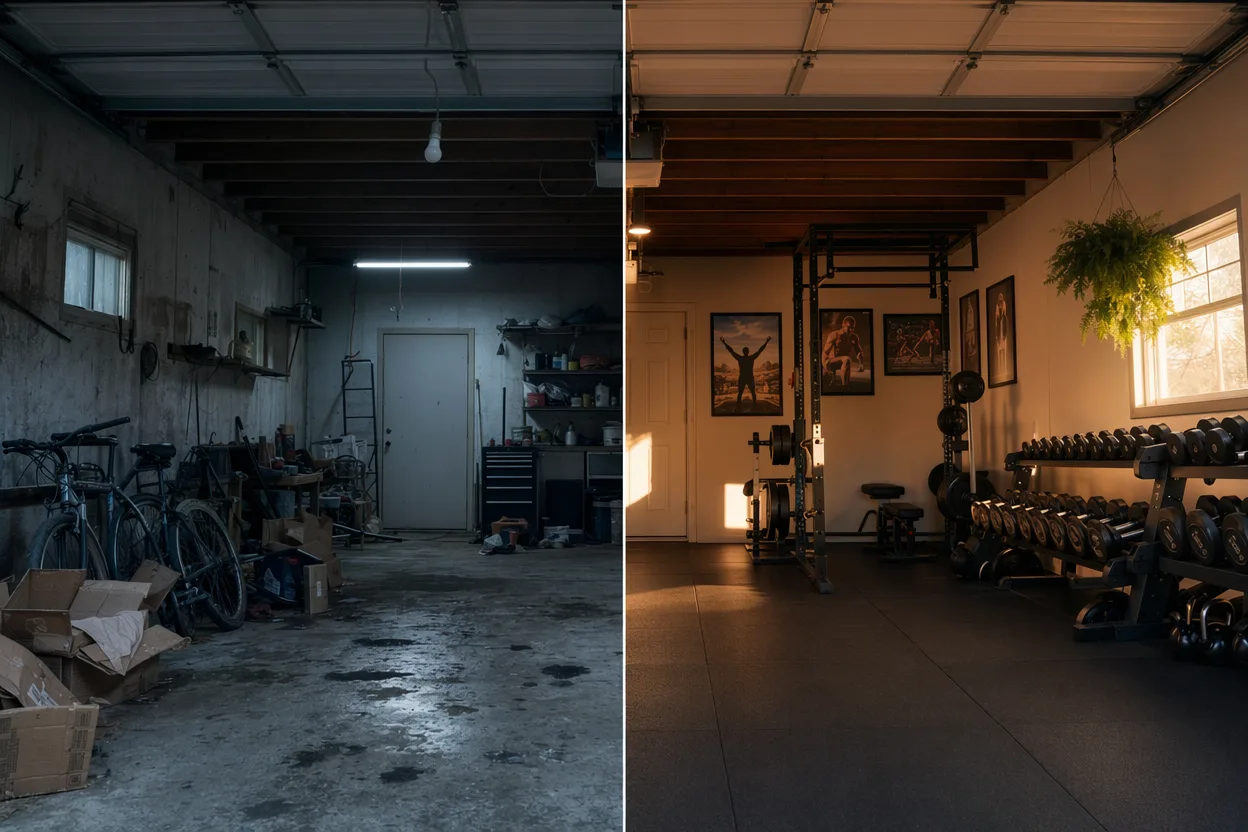
The transformation video is the most over-served format on Shorts and Reels, which is exactly why the AI version has to do it in one take. A cluttered suburban garage — bikes leaning, broken cardboard, a dead overhead bulb — turns into a clean home gym in front of the camera, ninety seconds, no cuts. Props swap with motion blur instead of dissolves. The fluorescent overheads warm and shift into late-afternoon sun coming through the open door. There is no human in frame at any point, which is what stops it from drifting into a renovation vlog and keeps the focus on the space itself.
A vertical 9:16 single continuous shot, locked-off wide of a cluttered suburban two-car garage interior. No human characters in frame at any point. The garage begins messy: leaning bicycles, stacked broken cardboard boxes, an oil-stained concrete floor, a dead overhead fluorescent tube. Over ninety seconds the space transforms in one unbroken take: boxes fade and morph into stacked rubber gym tiles, bikes swap-morph into a rack of dumbbells, the dead bulb warms on and shifts into late-afternoon golden-hour sun spilling through the open garage door, a hanging fern fades in, framed posters resolve on the back wall. Props transition with subtle motion blur, no hard dissolves. Lighting shifts gradually from cold blue fluorescent to warm gold. Sound: a barely-conscious rising synth bed, a single dumbbell clatter as the midpoint cue, last five seconds drop to clean room tone and one breath. End on the finished gym, still locked.
The architecture is doing the work here. The camera is locked-off, vertical 9:16, so the engine never has to invent a move — every frame change has to come from inside the frame. Naming "motion blur, no hard dissolves" for the prop swaps is the single most important line in the prompt, because it tells the model what not to do (the lazy crossfade) and forces it into the morph behavior the format actually demands. Lighting is written as a continuous shift, not a cut, which lets the room feel like it's warming rather than being replaced. The sound bed is almost absent on purpose — one rising synth, one dumbbell cue, five seconds of breath — and the "no human characters" rule keeps the focus on the space transforming itself.
Key visual: a locked vertical 9:16 wide, props swapping with motion blur, light warming from blue fluorescent to gold. Key sound: a near-subliminal rising synth, a single dumbbell clatter at the midpoint, five seconds of clean room tone.
POV and documentary-style prompts
These four AI video prompts share a single trick: the camera pretends it has a job. A helmet selfie-cam, a police bodycam, a street reporter's news rig, a cameo lens dropped into a place no civilian could ever reach — each one borrows the format of footage that already exists in the wild and uses that borrowed authority to sell something impossible. The deadpan is the engine. Nobody on screen winks. The frame insists it is real, and the joke (or the awe) lives in the reader's quiet realization that it cannot be.
The shared DNA across the four is handheld micro-shake or institutional fisheye, motivated diegetic sound instead of scored music, native lip-sync over whisper or muffled voice, an aspect ratio that signals the device (9:16 phone, 4:3 bodycam, 16:9 broadcast), and one moment of background detail that doesn't pay off the way a scripted scene would — because real footage rarely does. Hit those five, and the format reads as captured rather than composed.
5 — Desert guard's vlog from a cantina bathroom
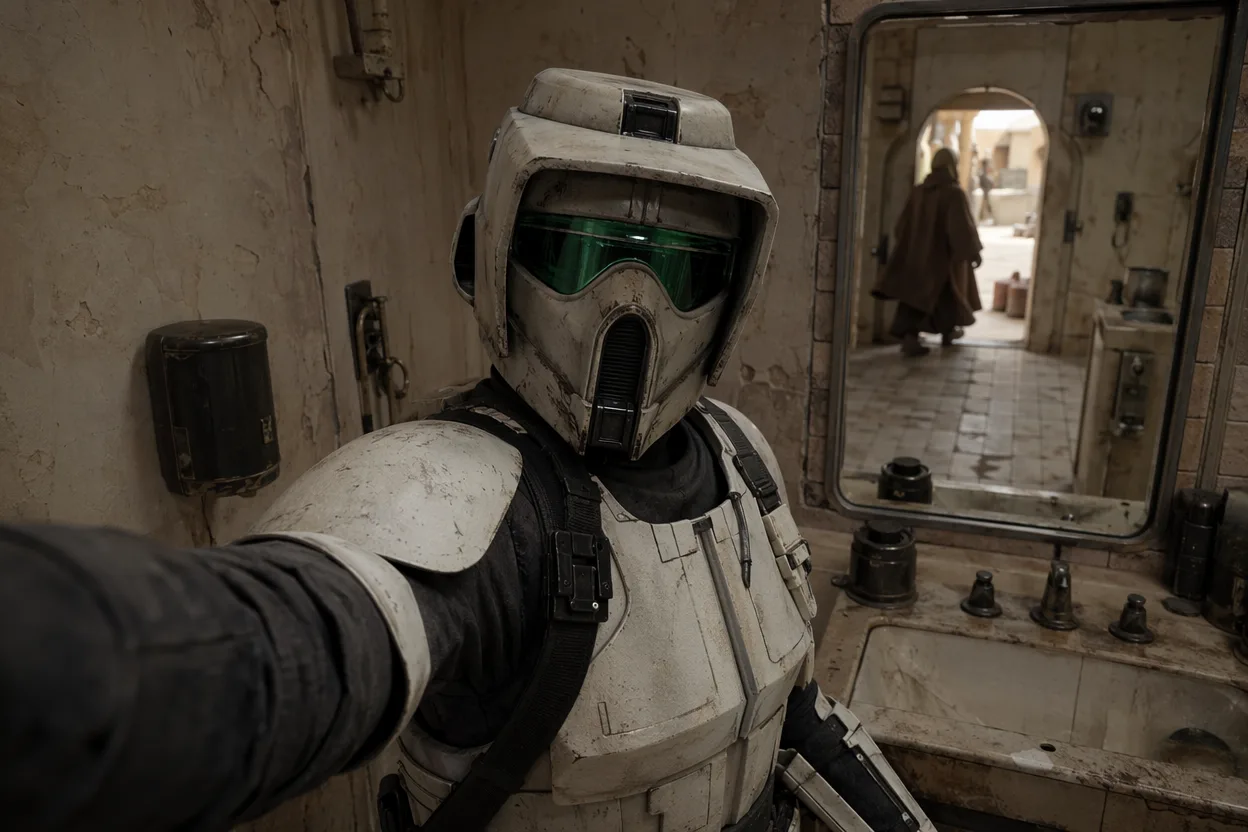
The shot is one continuous vertical selfie from an armored guard at a remote desert outpost, leaning against a sink in the cracked-tile bathroom of a roadside cantina. He's complaining about his roommate eating the last of his ration bars. His face is fully covered, so the performance lives in helmet tilt, the muffled cadence of his voice, and the small armored gestures of his free hand. Overhead fluorescents wash the visor a sour green. In the mirror behind him, a robed silhouette walks past the open doorway. He never notices. That single uncaught background event is what flips the scene from a costume bit into something the algorithm rewards as "wait, what just happened."
Vertical 9:16 handheld selfie video, point-of-view of a fully armored desert outpost guard in a white helmet and chest plate, holding his own phone-cam at arm's length in front of a dusty bathroom mirror inside a roadside cantina. He vents directly to camera about his roommate eating his rations, voice muffled from inside the helmet, head tilting in small frustrated arcs. Cracked tile walls behind him, harsh overhead green fluorescent buzzing, slight greenish cast on the visor, subtle vertical handheld wobble, occasional autofocus hunt. In the mirror reflection a robed figure walks past the open doorway behind him; he does not react. Distant cantina music thumps through the closed door, a toilet flushes off-frame, armor plates squeak against the sink edge. End on him sighing and lowering the phone.
The camera choice does most of the work: a phone held at arm's length forces the 9:16 frame, the micro-shake, and the autofocus hunt that signal "this is a real upload, not a render." Putting the only light source overhead — and tinting it fluorescent green — paints the visor in the exact skin-tone register a security cam would, so the helmet stops reading as a costume and starts reading as workwear. Muffling the voice inside the helmet anchors the audio to the geometry of the prop, and reserving every other sound (cantina thump, flush, squeak) to diegetic sources keeps the scene out of "scripted short" register. The unnoticed silhouette is the scroll-stopper — drop in your own one-frame surprise and you have the format. You can paste any of them into the editor and rerun this skeleton with a knight, a deep-sea diver, or a hazmat tech in place of the guard.
Key visual: green fluorescent bouncing off a helmet visor as a robed figure crosses the mirror unnoticed. Key sound: muffled in-helmet venting, distant cantina thump, the wet thunk of a flush off-frame.
6 — Bigfoot bodycam footage from a domestic disturbance
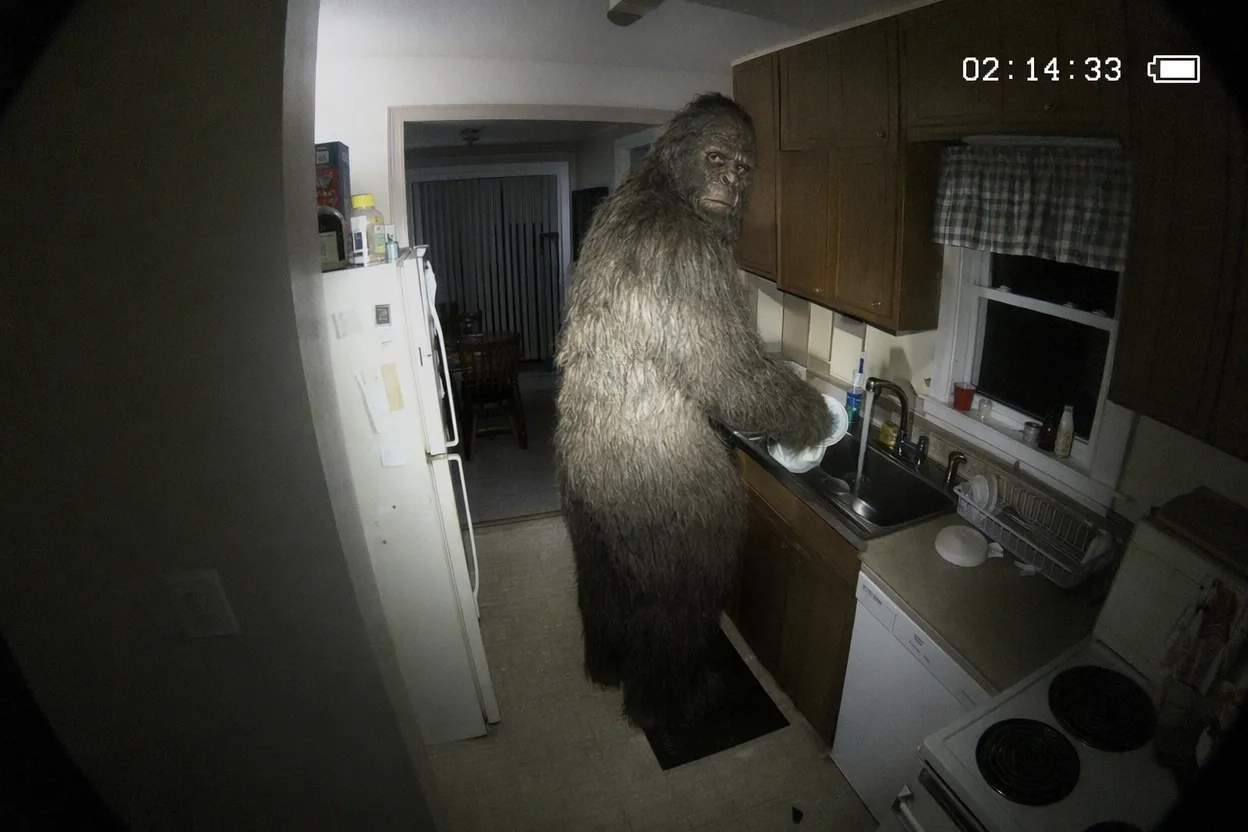
The setup is a noise-complaint call to a suburban duplex, opened on the wide fisheye of a chest-mounted police bodycam. The officer's flashlight beam swings across a hallway, then up to a kitchen doorway, where a fully convincing Bigfoot is at the sink rinsing dishes. He turns, gives a polite over-the-shoulder grunt, and goes back to scrubbing. The bodycam never reframes the way a cinematographer would. The time-code keeps burning in the corner. Low-res sensor noise crawls in the shadows. The whole bit lives or dies on whether the camera believes it is doing its actual job — recording a routine welfare check — instead of presenting a cryptid. This is the template for any institutional-camera-meets-impossible-subject short, and it sits comfortably next to horror-story prompt recipes built on the same five dimensions when the tone needs to lean darker.
Police body-worn camera footage, chest height, wide-angle fisheye lens with mild rolling shutter, white time-code burn-in 02:14:33 with a battery icon in the upper right, low-resolution sensor noise in the shadows. A uniformed officer enters the front door of a suburban duplex on a noise complaint, duty-belt flashlight beam striping the hallway wall. The beam swings up to a kitchen doorway and finds a fully photoreal Bigfoot at the sink, rinsing dishes calmly under a yellow ceiling light, fur damp at the wrists. He glances over his shoulder, gives a polite low rumble, then returns to scrubbing. Crackling police radio dispatch, running sink water, soft 90s soft rock leaking from a neighbor's apartment, no scored music. End on the officer pausing in the doorway, flashlight still raised.
The whole illusion runs on camera physics, not creature work. Fisheye distortion at the edges of the frame, a slight rolling-shutter wobble when the officer turns, time-code in the corner, and the flashlight as the only added light source — those are the four signals a viewer subconsciously reads as "real bodycam." Letting the duty-belt torch be the key light means the fur gets striped with a hard, motivated beam instead of an even cinematic wash, which is precisely the difference between "creature feature" and "captured footage." The audio stack — radio sizzle, sink water, neighbor's soft rock, the cryptid's low conversational rumble — keeps every sound source diegetic. Nothing is scored. Nothing is staged. The polite glance back is the punchline.
Key visual: fisheye flashlight beam striping wet Bigfoot fur over the kitchen sink, time-code still burning in the corner. Key sound: police radio sizzle layered under running tap water and a neighbor's 90s soft rock.
7 — Pigeon-on-the-street vox pop about the cost of crumbs
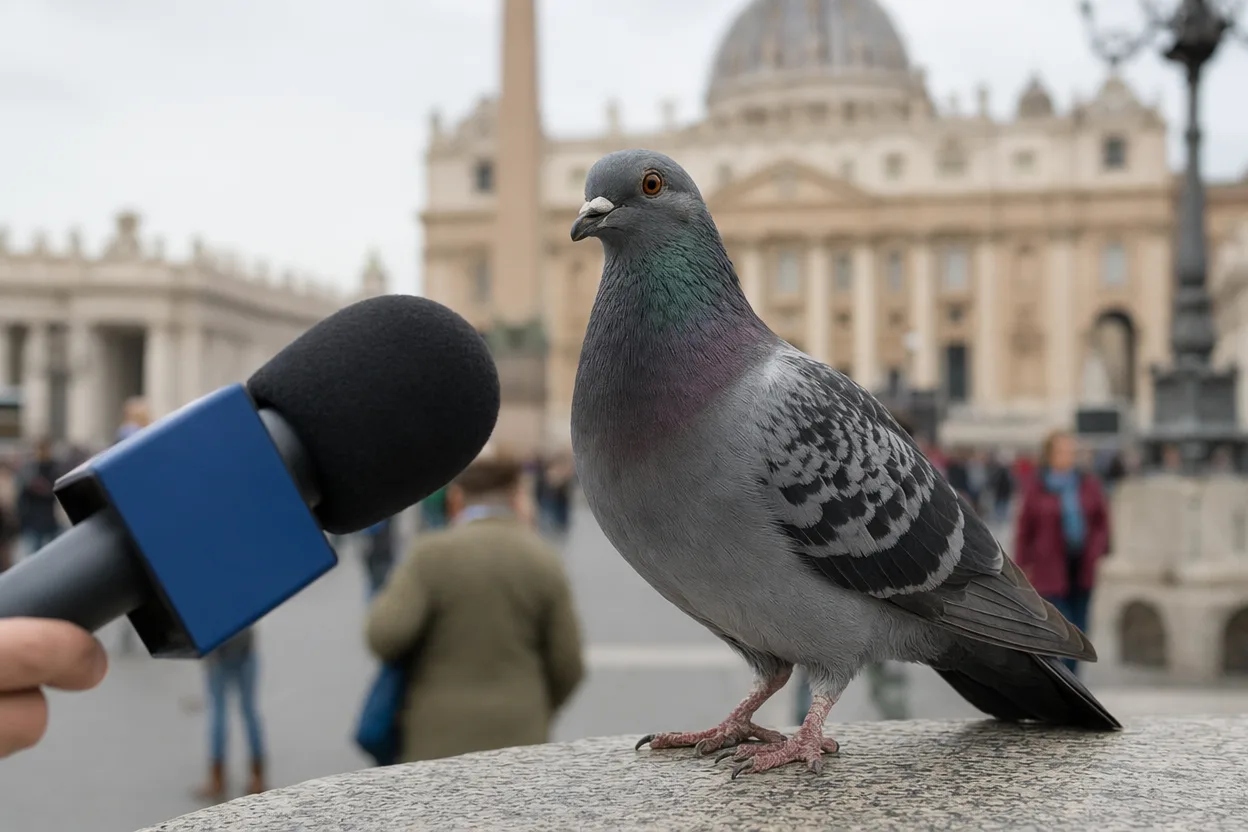
The frame opens on a busy city plaza in soft afternoon light. A street reporter's foam-covered microphone drops in from the left edge of frame, the mic flag unbranded, and the camera racks focus onto a pigeon perched at human eye-level on an iron railing. The reporter, offscreen, asks for thoughts on the rising cost of breadcrumbs in 2026. The pigeon answers in a clean human voice, deadpan, no inflection. Tourists drift past, blurred out by a wide-open aperture. One offscreen laugh leaks in at the tail. The joke is structural: the format of a real street interview is played 100% straight, and the interviewee happens to be a bird. Don't write the joke into the script. Let the framing carry it.
Handheld 16mm-wide street interview shot in a busy European plaza, soft overcast afternoon light. A foam-covered news microphone with an unbranded blue mic flag drops into frame from the left at chest height. The camera racks focus from the mic foam onto a single pigeon perched at human eye-level on a polished iron railing, feathers in sharp detail, background tourists blurred out by a wide-open aperture. Offscreen reporter asks the pigeon, in a level professional tone, for its view on the 2026 cost-of-crumbs crisis. The pigeon turns its head once, then answers in a deadpan clear human male voice with one slow sentence. Live street ambience — footsteps, distant car horns, a tram bell — soft mic-handoff thunk, one quiet laugh from offscreen at the tail. End on the pigeon staring directly into the lens.
The wide-aperture rack-focus is the entire bit of cinematography that sells the format. By starting the lens on the mic foam and pulling onto the pigeon's eye, the prompt forces the generator into the same camera language broadcast journalists actually use, which signals "real street piece" before a single word is spoken. The unbranded mic flag dodges any model's reluctance to render a real outlet logo while keeping the institutional silhouette intact. Lighting stays neutral overcast on purpose — sunny vox-pops look styled, overcast vox-pops look unplanned. Audio is fully diegetic: live plaza ambience, the small physical thunk of the mic, the pigeon's deadpan delivery, and one offscreen laugh that confirms a human crew is present without showing them.
Key visual: focus pulling from mic foam onto a pigeon's eye while plaza tourists blur in the distance. Key sound: street ambience and a mic-handoff thunk under the pigeon's flat one-line answer.
8 — Cameo self-insert: morning yoga on the surface of Mars

The cameo motif puts the reader's own recognizable face into a place they could never stand. Here it is the wide anamorphic vista of a Martian plain at dawn: a white-and-orange suit, a tree pose held against copper-red dust drifting laterally across frame, Phobos cresting a distant crater rim, sun flare opening across the horizon. The helmet glass reflects a cyan-and-rose sky and, faintly, the line of the reader's own jaw. The point is not novelty of landscape — it is face-anchor coherence frame after frame under impossible lighting. Treat the cameo subject in the prompt as a named, locked reference, then specify the environment, the lens, and the suit so the only variable for the generator is the world around the face.
Wide cinematic anamorphic 2.39:1 shot at dawn on a red Martian plain, a single figure (cameo subject, face visible through the helmet glass) in a white-and-orange spacesuit holding a tree-pose yoga stance on a flat rocky outcrop. Copper-red dust drifts laterally across the foreground in slow ribbons, Phobos rises low over a distant crater rim, a sun flare opens horizontally across the top of frame. Helmet visor reflects a cyan-and-rose sky and a sliver of the subject's own jawline. Hold the pose for the duration of the shot, only the suit's chest plate rising and falling with breath. Soundtrack is the hush of suit-internal breath through a regulator, an impossibly thin high wind, and a single low synthesised heartbeat layered underneath. End on the sun cresting the crater rim.
The face is the asset; everything else is staging. Naming the cameo subject as a locked reference at the top of the prompt tells the generator the identity must survive every reflection and every dust-stream that passes the visor — that's how you stop the face from drifting into a generic astronaut at frame 80. The anamorphic 2.39:1 frame gives the horizon room to breathe and pushes the figure into the lower third without crowding the cameo. Using the visor as a reflection surface for sky color (and a glimpse of the subject's own jaw) is what turns a stock spacesuit shot into a portrait. The audio is mostly silence — regulator breath, thin wind, one heartbeat — because every added layer would compete with the face for the viewer's attention.
Key visual: a cameo face inside a helmet visor reflecting cyan sky while Phobos crests a distant Martian crater. Key sound: regulator breath under an impossibly thin wind and a single synthesised heartbeat.
Iconic character and format-hijack prompts
The next four AI video prompts run on the same comedy engine: drop a recognizable character archetype into the wrong room, or rebuild a familiar period format with surgical precision, then refuse to wink at the camera. None of the four name a copyrighted character or director by name — that's deliberate. The reader gets a robed villain, an auteur cadence, a 1986 cereal spot and an impossible ASMR loop as structural templates they can reskin in five minutes. The shared rule is tonal commitment: the helmet stays on, the voiceover never smirks, the scanlines do not flicker out for a single frame.
Across every entry below, the visual language is borrowed wholesale (cabin lens, locked-off living room, VHS chroma, macro overhead), the sonic language is borrowed even harder (PA chime, gravelly cadence, slap-bass jingle, glass-on-glass chime), and the structural trick is the same: a high-status register applied to a low-status (or impossible) task. Every prompt names the lens, the lighting, the sound bed and the exact final beat — because the joke dies the second the generator drifts.
9 — Robed villain works a six-hour shift as a flight attendant
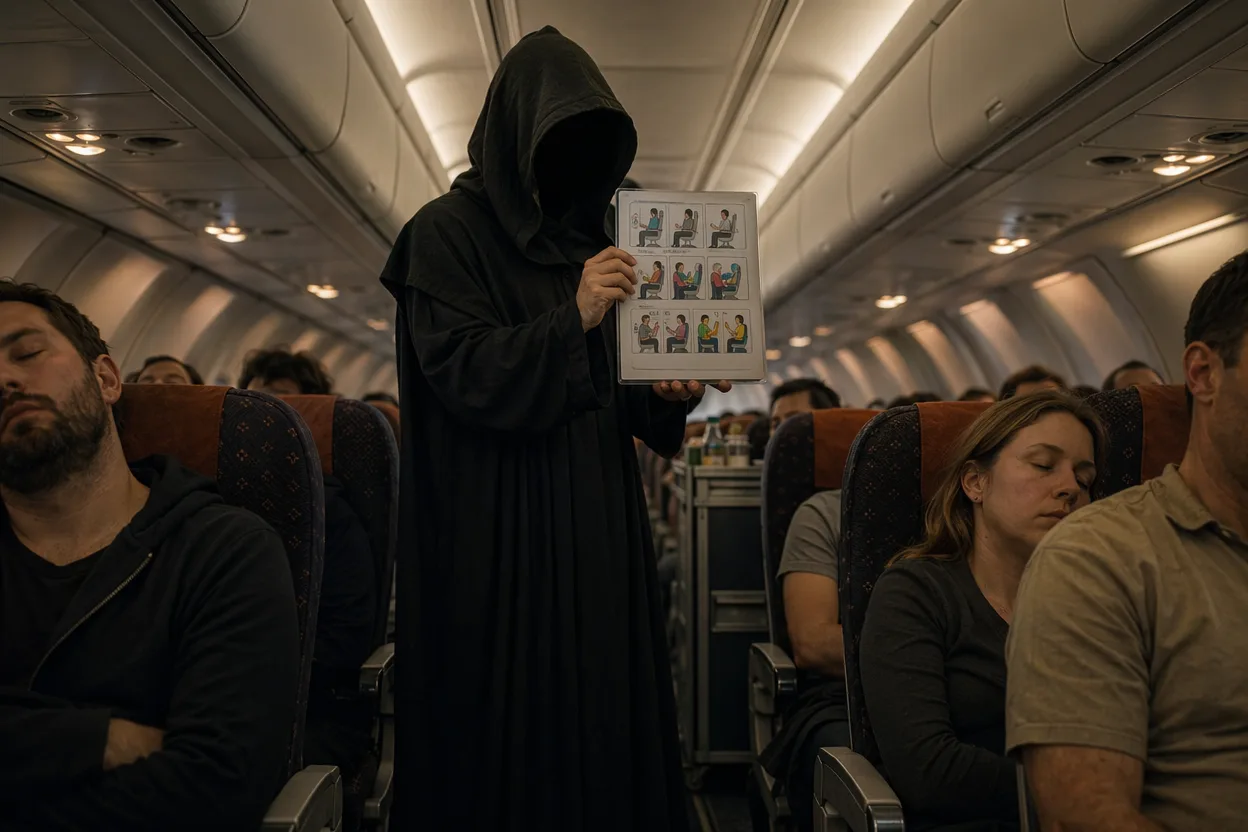
A tall figure in flowing dark robes and a polished black helmet stands in the narrow aisle of a budget short-haul flight, holding a laminated safety card with a black-gloved hand. A long red lightblade is clipped neatly to his belt next to a service-cart key. He demonstrates the seat-belt buckle with the patience of a flight attendant on his fourth turn of the day. Two rows back, a baby is crying. The cabin crew steps around him with drinks. Nobody acknowledges the costume, the breathing, or the blade. The joke is the absence of reaction — everyone, including the villain, is just trying to get through the shift.
Tight 24mm cabin lens, narrow aisle of a discount short-haul airliner mid-flight, slow dolly forward at walking pace. A tall figure in flowing dark robes and a polished black helmet, long cape brushing seat headrests, demonstrates the seat-belt buckle of a laminated safety card to two seated passengers. A red glowing blade is clipped to his belt next to a service-cart key. Overhead reading lights cast soft top-light, picking out the helmet curve and the seat-back fabric. Sound: heavy mechanical breathing inside the helmet, cabin PA chime, plastic seat-belt clack as he demonstrates, plastic cups rattling on a trolley behind him, a baby crying two rows back, no music. Photoreal. Final beat: he nods once, lowers the safety card, the dolly stops. Generic costume, no franchise logos.
The 24mm cabin lens is doing the heavy lifting because it compresses the aisle and forces the cape to brush real seat backs — that contact sells the staging. Overhead reading lights instead of a film key keep the lighting honestly fluorescent, which is what makes the costume look incongruous instead of cinematic. The slow forward dolly mirrors the cadence of an in-flight safety demonstration and lets the audience watch the breath fog the helmet visor. On the sound side, the helmet breathing under the PA chime is the entire emotional payoff — high-register menace layered over the most boring announcement in transit. The final-beat nod gives the editor a clean cut point.
Key visual: A robed black-helmeted figure pinching the corner of a laminated safety card under the cabin's overhead reading light. Key sound: Heavy mechanical breath layered under a cheerful PA chime and a distant baby cry.
10 — Deadpan documentary auteur narrates an IKEA assembly
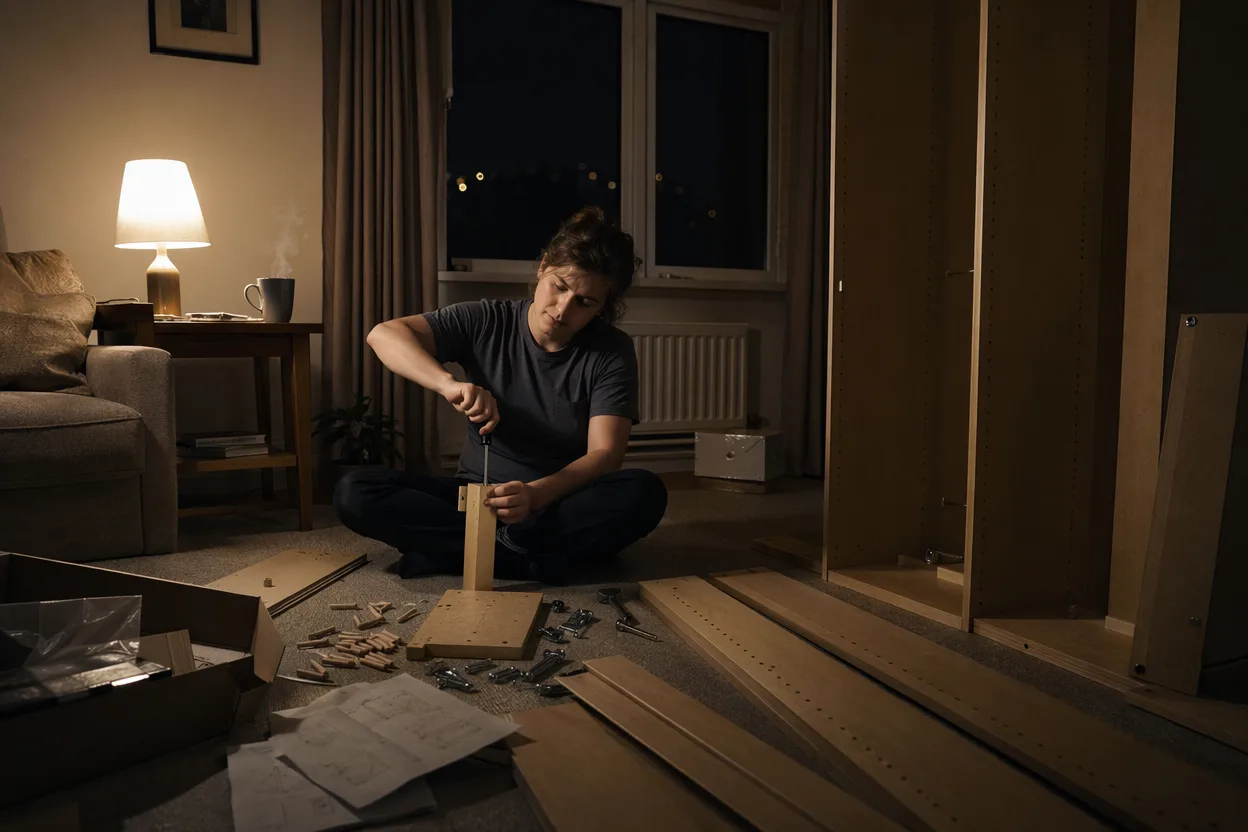
A single living-room shot, locked off at eye level, daylight spilling sideways through a window onto bare floorboards and a half-assembled flat-pack wardrobe. Hands enter and leave the frame: turning a dowel, lining up a panel, holding an Allen wrench like a question. The assembler's face is never shown — only torso, hands and the slow accumulation of cardboard. Over the top, a gravelly European-accented voice intones in long pauses about the indifference of pre-drilled holes and the quiet humiliation of the hex key. The voice never lifts. The hands never stop. The wardrobe never finishes inside the clip.
Static locked-off mid-shot, living room interior at eye level, soft daylight from a window camera-right falling across bare floorboards and a half-assembled flat-pack wardrobe. A pair of hands enters frame, turns a wooden dowel into a particleboard panel, tests an Allen wrench against a hex bolt. Mid-shot of the assembler's torso only — no face visible, neutral grey sweatshirt, cardboard scattered around. Occasional close-up cutaways to a single screw spinning, a torn corner of cardboard. Sound: slow gravelly European-accented voice-over with long pauses, the click of plastic dowels seating, cardboard tearing, distant traffic outside, no music. Photoreal. Final beat: the hands set the Allen wrench down on the floor; voice-over trails off mid-sentence. Generic flat-pack, no brand text.
The locked-off mid-shot is what gives the voiceover room to breathe — any camera movement would compete with the cadence, and the cadence is the whole joke. Side window daylight is unflattering on purpose; it removes any cinematic flattery from the task and makes the narration feel like it's commenting on a real domestic moment. Keeping the assembler's face out of frame turns the hands into the only character, which lets the European-accented voice carry the emotional register without anyone visibly performing it. The cardboard-tear and dowel-click foley sits at conversation volume, so the narration never has to compete with the sound bed for attention.
Key visual: A pair of hands on a sunlit living-room carpet, holding an Allen wrench above a half-assembled wardrobe panel. Key sound: Slow gravelly voiceover over plastic dowel clicks and faint outside traffic.
11 — Nineteen-eighty-six cereal commercial for a fake brand
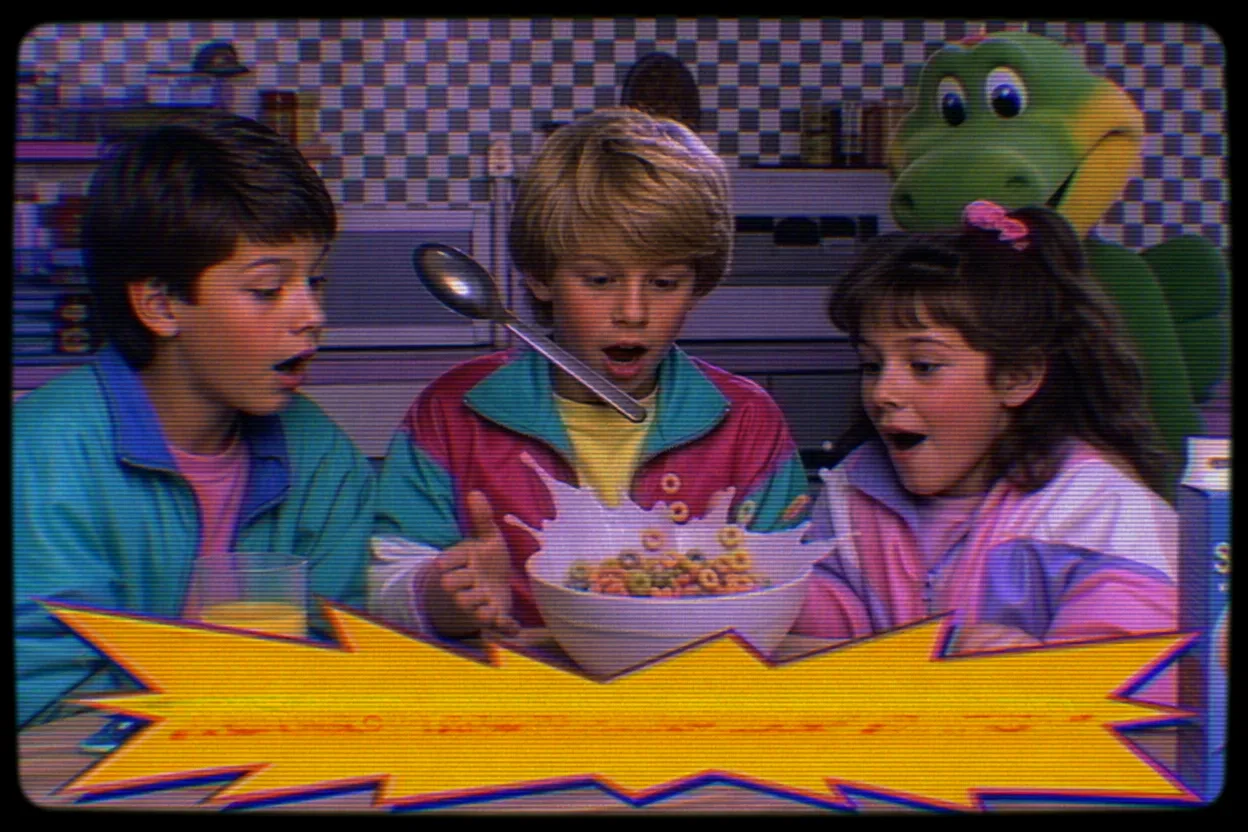
A thirty-second 1986 cereal spot for a brand that never existed. Three children in pastel windbreakers sit at a checkered-tablecloth kitchen, primary reds and yellows pushed to the edge of bleeding, mid-zoom into a milky bowl as a spoon flies in from offscreen. A neon starburst graphic explodes across the lower third. A deep-voiced male announcer drops the tagline, the children's chorus chants the slogan, the box rotates in a slow hero shot against a void-black backdrop. CRT scanlines crawl over every frame. The joke isn't the brand, which is left blank-able — the joke is how completely the format has been rebuilt. Period work like this also doubles as scaffolding for any retro-leaning birthday video generator project where the gag is the era, not the gift.
1986 children's breakfast cereal television commercial, 4:3 safe-frame composition, heavy CRT scanlines, chroma bleed on saturated reds and yellows. Open on a kitchen with checkerboard wallpaper and a checkered tablecloth, three children aged seven to ten in pastel windbreakers smiling at camera, mid-zoom into a milky cereal bowl as a spoon flies in from the right. Cut to a neon starburst lower-third graphic, cut to the cereal box rotating slowly on a void-black hero shot. Sound: compressed mono mix, upbeat synth-and-slap-bass jingle, children's chorus chanting a four-syllable slogan, deep-voiced male announcer delivering the tagline over the final box shot, classic crunchy cereal-pour foley. Photoreal video-tape aesthetic. Generic fictional brand, no readable text.
The 4:3 safe-frame is non-negotiable — widescreen instantly breaks the era. CRT scanlines and chroma bleed are doing the work that period camera grain does in a film prompt; without them the saturated reds read as Instagram, not Saturday morning. The mid-zoom into the bowl is a structural 1980s edit beat that every cereal spot of the decade used, and the void-black hero shot is the closing tableau that anchors the brand even when there's no readable name. The slap-bass jingle and children's chorus are the era's signature mix — leave them out and the spot reads as a parody instead of a commit. Period audio finishes the illusion the picture starts.
Key visual: A mid-zoom into a milky cereal bowl as a spoon enters from the right, framed in 4:3 with crawling scanlines. Key sound: A slap-bass synth jingle topped by a children's chorus and a baritone announcer tagline.
12 — Glass-fruit knife cut — impossible-physics ASMR loop

A pristine top-down macro: a chef's knife descends in real time through a single translucent crystal apple resting on an oak chopping board. The blade meets resistance the way it would with glass, then parts the fruit cleanly down the middle. Crystalline shards refract the overhead light into thin rainbow shafts across the wood. There is no music. There is no narration. The clip ends exactly where it began — a slight rocking of the two halves and a return to stillness — so it can loop forever. If this scene appeals, you'll find twelve ASMR-specific shot recipes built on the same macro-loop logic with different materials and props.
Top-down macro shot, locked off, 100mm lens, 0.5x speed. A chef's knife with a brushed steel blade descends slowly into a single fully transparent crystal-glass apple resting on a dark oak chopping board. The fruit splits cleanly, halves rocking apart, revealing tiny faceted glass seeds inside. Single soft overhead key light through a sheer scrim catches the blade edge and throws refracted shards of rainbow light across the wood grain. No hands fully in frame — only fingertips on the knife handle. Sound: a sharp clean glass-on-glass slicing chime as the blade enters, a low resonant ring as the halves rock, a dull wood thud as the knife taps the board, gentle ambient room tone, no music, no narration. Photoreal. Final beat: halves come to rest, three seconds of stillness for a seamless loop.
Top-down macro is the only framing that sells impossible-physics ASMR — any side angle exposes the geometry trick and breaks the spell. The 100mm lens at 0.5x speed buys the eye time to register the refraction, which is the visual payoff the prompt is built around. A single soft overhead through a scrim avoids glare on the glass surface that would otherwise blow out the cut. On the audio side, the glass-on-glass chime is the dominant beat — it has to land before the wood thud, or the brain reads the object as resin instead of crystal. The three-second tail of room tone is what makes the loop seamless; without it, the playback seam is audible on every repeat.
Key visual: A brushed-steel knife mid-cut through a transparent crystal apple, rainbow refraction shards across an oak board. Key sound: A clean glass-on-glass chime resolving into a low resonant ring and a dull wood thud.
Three prompt mistakes that wreck the render
Here's what kills a watchable render even when the prompt looks long.
Vague action verbs. The single most common failure is asking for an action without specifying its tempo, direction, or terminal pose. "Walking around," "doing stuff," "interacting" — these aren't instructions, they're shrugs, and the renderer answers with the same shrug. Models trained on millions of clips need a vector: who moves, at what speed, in what direction, and where do they stop. Replace every soft verb with a specific physical action plus a pace cue and a frame relationship. The fix takes ten extra words and saves you three regenerations.
Before: "a person walking around the city at night"
After: "a courier on a moped passes left-to-right at 1.2× walking pace, brakes at frame-center, kicks the stand down"
Conflicting camera moves. The second wreck happens when a prompt requests two incompatible motions in one shot — "slow zoom while panning," "drone reveal that becomes a handheld follow," "dolly-in during a 360 orbit." Real cinematography lets one motion own a shot; the renderer doesn't have the choreography to blend two, so it picks an awkward average and the output wobbles. Choose the motion that matches the emotion (dolly for intimacy, drone for scale, handheld for urgency, static for unease) and trust it for the whole eight seconds.
Before: "a slow panning shot while also zooming into the subject's face"
After: "locked-off static medium close-up, subject fills lower-right third, no camera motion"
Sound forgotten. The third mistake is treating the prompt as a still-image brief. If you don't name the audio, you get either silence, stock music, or — worst — a foley track that fights your visual. Every recipe in this post includes a "Key sound:" line for a reason. Name the diegetic source (footsteps on wet pavement, refrigerator hum, a single line of dialogue with a register tag) and the renderer's audio pass has a target. This is also where format matters: if you're hunting holiday-shaped scenes, the holiday-specific prompt set shows how a single sound choice — the click of a lighter, the scrape of a chair — anchors a whole memory.
Before: "father and child in a kitchen, warm light, emotional"
After: "father and child at the kitchen island; key sound: the soft clack of two coffee mugs, a quiet 'morning, kid,' refrigerator hum underneath"
Fix these three and the recipes below will hit on the first generate.
Pick the recipe that matches the platform you're shipping to tonight — a one-shot dolly for the portfolio reel, a fake-bodycam absurdity for Shorts, a hyperreal close-up for a story trailer — and run it through the five-dimension check before you hit generate. The framework is what lets you swap subjects without rewriting from scratch, and the anti-patterns are what stop you from burning a credit on a prompt that was never going to render.
If you want to keep going after these twelve, two adjacent reads pair well: the long single-take camera language in entry one transfers directly into structured beats for a full book trailer, and the noir-kitchen and bodycam registers extend into the cinematic dread tradition in our horror prompt library. Both posts use the same five-dimension scaffold, so the muscle memory carries over.
Open the editor at /dashboard and ship one of these tonight.
Tags
Frequently asked questions
01What makes a good AI video prompt?
02How do you write AI prompts for videos?
03Can you share effective AI prompt examples for beginners?
04Which AI tools can make videos from prompts?
05Are there free ways to test AI video prompts?
06Why does my generated video look generic?
07How long should an AI video prompt be?
Turn any story into a 60-second video
Story Into Video bundles image generation, animation, narration, and subtitles into one workflow. Free credits cover your first video.
Start creatingTry the tools mentioned in this article
Seedance 2 Story Video Generator
Seedance 2.0: any duration from 4 to 15 seconds, native audio, with image / video / audio reference inputs.
Nano Banana Pro Image Generator
The Gemini 3 image family — photoreal scenes, precise text-in-image and natural-language editing. Pro and Nano Banana 2 available.
Seedream 4.5 Image Generator
Seedream 4.5: story illustration, character sheets, scene concept art — with native Chinese-language prompt support.
Continue reading
AI Book Trailer Maker: Turn Any Manuscript Into a 60-Second Trailer
A complete 5-step workflow for making a 60-second book trailer with AI, plus six genre formulas you can paste straight into the editor — mystery, romance, thriller, literary, fantasy, and memoir.
12 min read
AI ASMR Video Ideas: 12 Formats You Can Generate Tonight
Twelve AI ASMR video ideas you can paste straight into the editor — sensory triggers, domestic rituals, sound-prop loops, and travel scenes, each one built around a single sound and a single frame.
12 min read
Horror Story Ideas: 12 Complete Scripts Ready for AI Video
Twelve horror story ideas written as full scripts you can copy directly into Story Into Video — no premise lists, no fragments, every story is a complete narrative ready to film.
15 min read